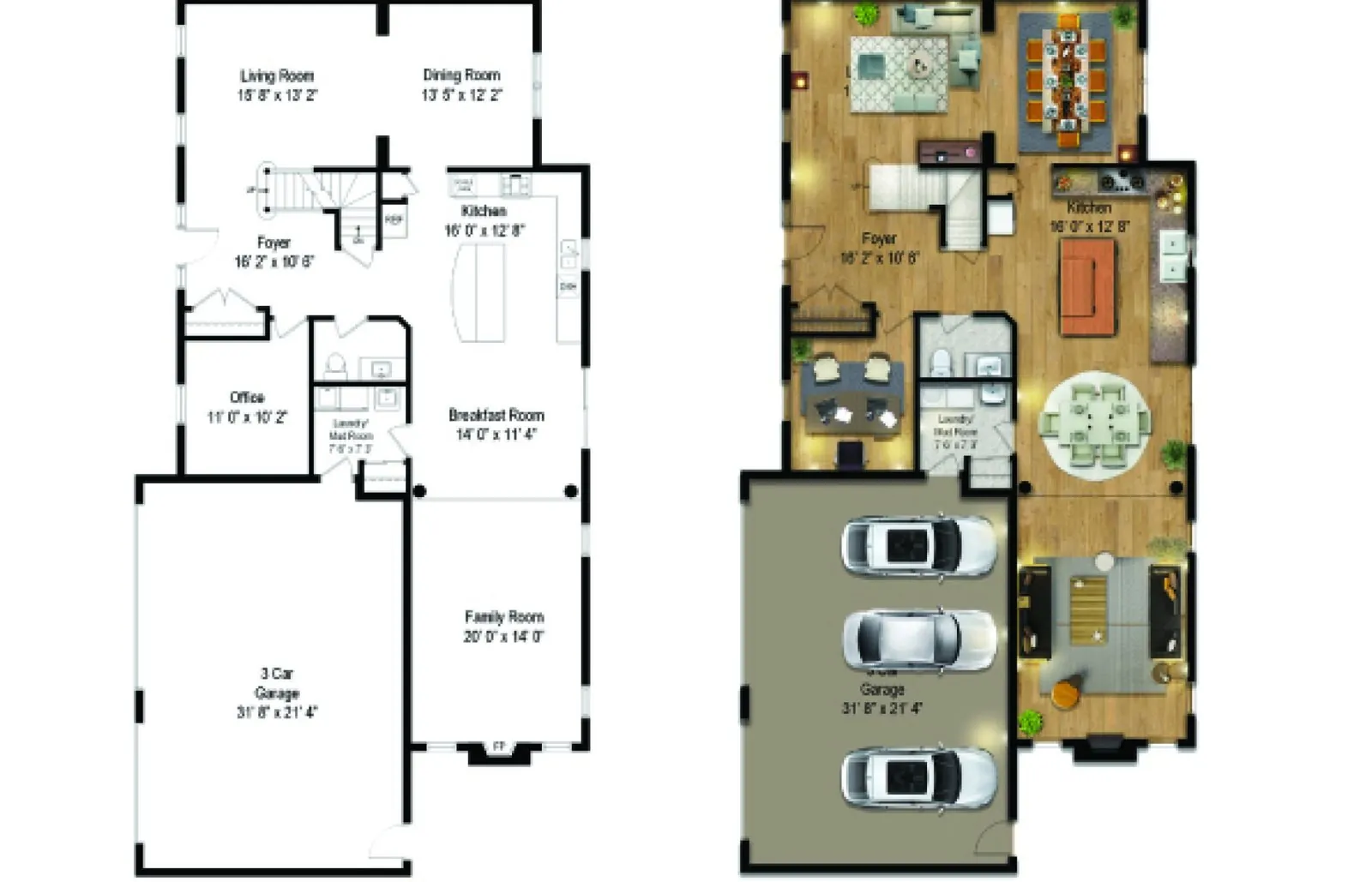
A 2D floor plan rendering is a flat, top-down drawing with colors, textures and furniture symbols, best for showing layout and room sizes clearly. A 3D floor plan rendering is a top-down or angled cutaway model of the whole home, with real furniture, materials and light, best for helping buyers feel the space. Most real-estate listings need at least a clear 2D plan; developers and premium listings often add a 3D plan for marketing. The right choice depends on who will look at it and what decision they need to make.
Here’s how the two compare, what clients usually need, and what to prepare so your floor plan renders come out right the first time.
Key takeaways
- 2D floor plans explain layout and sizes; 3D floor plans sell the feeling of the space.
- A clean, labeled 2D plan is the base for most listings; add 3D for premium or off-plan units.
- Send the latest CAD/DWG file or a sketch with all dimensions to avoid revisions.
- Keep furniture at real scale so the plan never misleads buyers.
What Is a 2D Floor Plan Rendering?
A 2D floor plan starts from an architectural drawing or CAD file and turns it into something a non-architect can read. Walls become solid and clear, floors get colors or textures (wood, tile, carpet), and furniture symbols show how each room can be used. Room names and dimensions are usually added.
Strengths of 2D Plans
- Clarity: The whole layout is visible at once, with nothing hidden behind walls.
- Measurements: Room sizes and labels are easy to read.
- Print friendly: Works well in brochures, listing PDFs and signboards.
- Quick to update: Changing a wall or a label is simple.
Limits of 2D Plans
- Hard for some people to imagine height, materials and atmosphere.
- Less eye-catching on social media compared with a 3D view.
What Is a 3D Floor Plan Rendering?
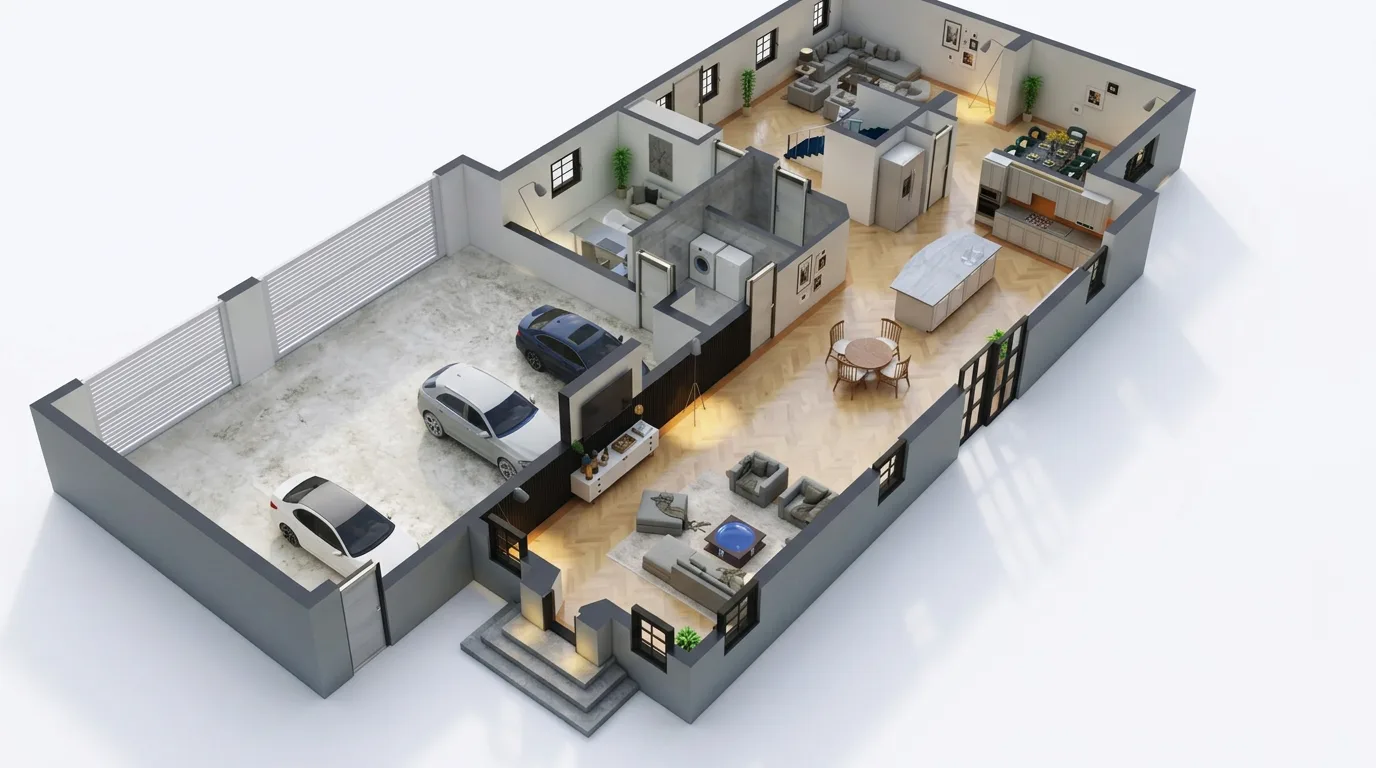
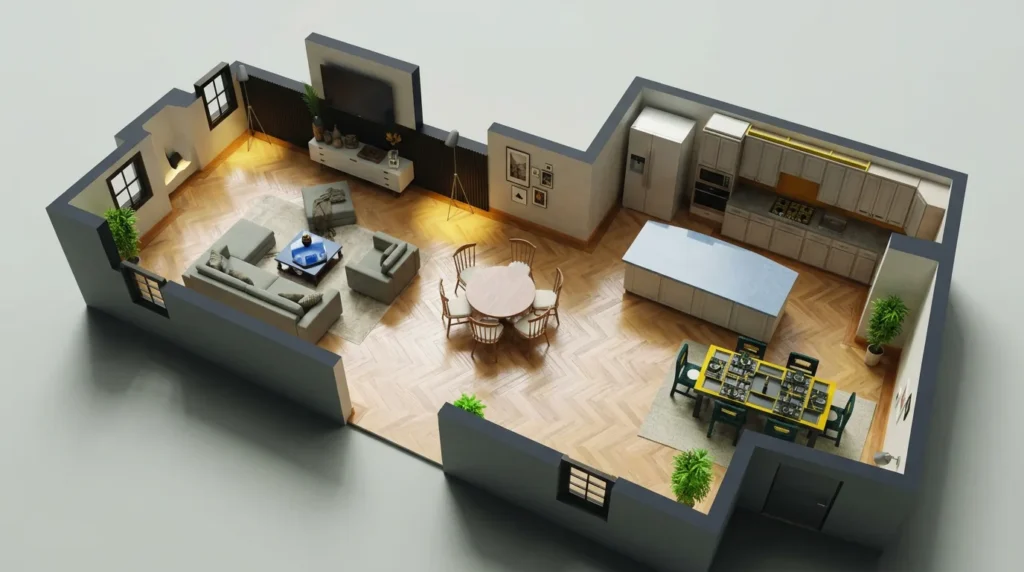
A 3D floor plan is a model of the home with the roof removed, viewed from above or at an angle. Walls have height, furniture is modeled, and materials and lighting look real. It looks like a dollhouse view of the property.
Strengths of 3D Plans
- Easy to understand: Buyers instantly see how rooms connect and how much space furniture takes.
- Marketing appeal: Strong for listing covers, ads and social posts.
- Design communication: Shows finishes, flooring and furniture style along with layout.
Limits of 3D Plans
- Wall height can hide small details, such as built-in storage, behind other walls.
- Dimensions are usually not labeled, or are harder to read.
- More modeling work than 2D, so it takes longer.
2D vs 3D Floor Plans: Side-by-Side
| 2D floor plan | 3D floor plan | |
|---|---|---|
| Main purpose | 2D explains the layout and sizes. | 3D sells the feeling of the space. |
| Best viewers | 2D suits agents, buyers comparing options and contractors. | 3D suits first-time buyers, investors and social media audiences. |
| Information | 2D carries labels and dimensions. | 3D carries materials, furniture style and light. |
| Effort | 2D is usually faster. | 3D needs full modeling and rendering. |
| Format | 2D is strong in print and PDFs. | 3D is strong in digital ads and presentations. |
What Clients Usually Need
Real-Estate Agents
A clean, labeled 2D plan for every listing is the base. For premium or off-plan properties, a 3D plan on top helps the listing stand out.
Developers and Builders
Before a project is built, buyers can’t visit it. 3D floor plans for each unit type, plus 2D plans with dimensions for brochures, give a complete package. These often go together with interior renders and exterior renders.
Interior Designers
A 3D plan helps present a furniture layout and finish palette to a homeowner in one image. A 2D plan with furniture dimensions helps the site team.
Homeowners Renovating
A 2D plan comparing “current” and “proposed” layouts is often enough to make decisions. A 3D view helps when family members can’t read drawings.
How to Prepare a Floor Plan Rendering Brief
Clear input saves revisions. Before you contact a visualizer, gather this:
- The latest drawing: CAD/DWG is best, a PDF or a clear hand sketch with dimensions also works.
- Wall heights, door and window positions, and any level changes or stairs.
- Room names and whether dimensions should be shown (and in which units: feet or meters).
- Furniture layout, or permission for the artist to suggest one.
- Flooring and finish choices, or a style direction (modern, warm, minimal).
- Required output: 2D, 3D or both, image size, and where it will be used (print, website, social).
You can turn this into a ready-to-send brief with our free Brief Builder, and get a rough idea of budget with the 3D Render Cost Calculator.
Which One Should You Choose?
If you’re still unsure, ask yourself one question: what decision will the viewer make from this image? If they need to check whether their furniture fits or compare room sizes between units, choose a 2D plan. If they need to fall in love with the layout, or understand an off-plan project they can’t visit, choose a 3D plan. If the plan will appear in a listing, a brochure and an ad campaign, order both from the same drawing so they match exactly.
Budget and timeline matter too. A 2D plan is a sensible first step for most listings, and a 3D plan can be added later for the key unit types. Doing them together, though, is often more efficient, because the walls and layout are checked once and reused.
How I Approach 3D Floor Plans in 3ds Max
For 3D plans, my workflow in 3ds Max with V-Ray is:
- Walls from the plan: Import the CAD as a reference and trace walls at real height, then cut them at a consistent height so the inside is visible.
- Furniture to scale: Use furniture that fits the real room sizes, so the plan doesn’t mislead.
- Soft top light: A soft dome light or overcast HDRI keeps shadows gentle so no room goes dark. Hard sun can hide parts of rooms.
- Camera: A straight top view for clarity, or an angled view for marketing. An orthographic or long-lens camera keeps distortion low.
- Clean post-production: Even colors, a clean background, and sometimes labels added afterwards.
Common Mistakes
- Out-of-date drawings: Rendering an old plan and finding out after delivery that a wall moved.
- Furniture not to scale: Small furniture makes rooms look bigger than they are, which can mislead buyers.
- Too much detail in 2D: Heavy textures and shadows make a 2D plan hard to read. Clarity comes first.
- Walls too high in 3D: Tall walls hide room interiors from an angled view.
- No units agreed: Mixing feet and meters across a brochure confuses buyers.
Frequently Asked Questions
Is a 3D floor plan better than a 2D floor plan?
Not better, just different. 2D is clearer for layout and sizes; 3D is better for showing how the space feels. Many listings use both.
What file do I need to give for a floor plan rendering?
A CAD/DWG file is ideal. A PDF drawing or a clear sketch with all dimensions also works, but may need more checking.
Can a 3D floor plan show dimensions?
Labels can be added in post-production, but they are harder to read than on a 2D plan. If dimensions matter, include a 2D plan as well.
Can you make a floor plan from a hand sketch?
Yes, as long as the main dimensions, door and window positions are clear. Anything missing has to be confirmed before rendering.
Should every unit type in a building have its own 3D plan?
For developers, each unit type usually gets its own plan, because buyers compare layouts. Mirrored units can often reuse the same model.
References
Official documentation and research used for this article:
- NAR: Make Sure Your Online Listings Shine – why listings need strong photos, staging and floor plans.
- Wikipedia: Floor plan – what a floor plan shows and how it is drawn.
Need Floor Plans or Interior Renders?
You can see 2D and 3D floor plan samples in my portfolio. Share your drawing on WhatsApp, tell me if you need 2D, 3D or both, and I’ll come back with an exact quote.